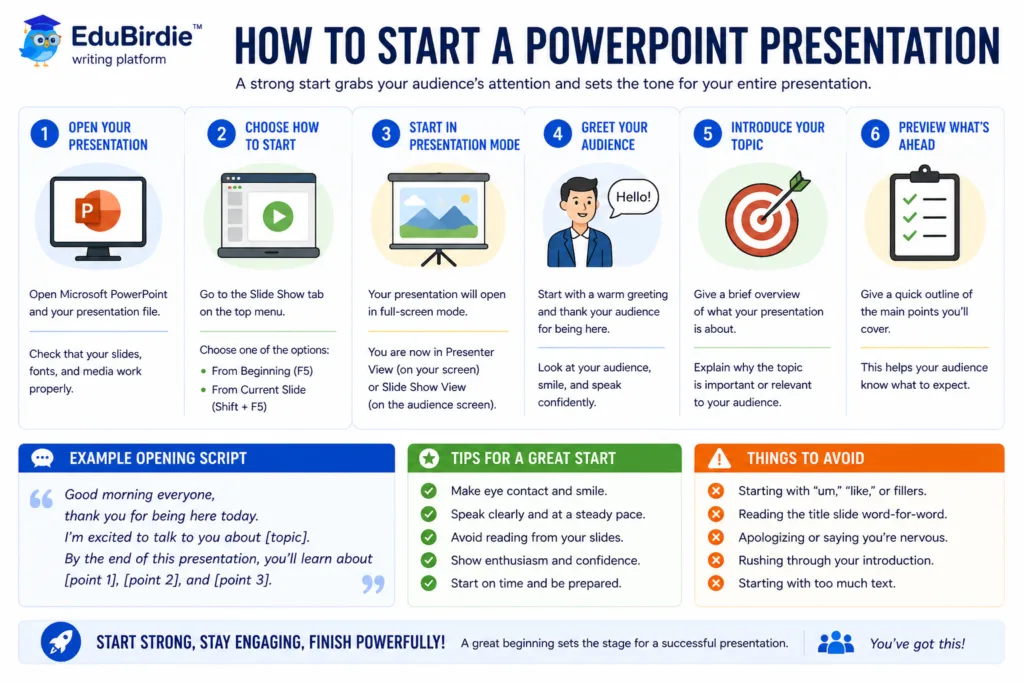
Start a PowerPoint presentation with a clear title slide, a brief hook, and an explanation of what the audience will learn. The first minute should establish relevance and direction. Avoid crowded slides; use a strong visual, question, fact, or short story that supports the main message.
Starting a presentation often feels harder than creating the entire slide deck. Many students polish every slide, yet freeze when it’s time to speak. The truth is simple: how you begin sets the tone for the presentation.
Your first slide is your chance to win the audience’s attention within the first 30 seconds. A strong opening makes people curious, excited, or even surprised, while a weak one risks losing their interest immediately. Your main task here is to spark your audience’s emotions like curiosity, humor, fear, or amazement. You must make your message memorable and create engagement from the very beginning.
EduBirdie is a perfect partner if you need powerpoint presentation services. That’s why we are happy to share our knowledge with you.
Below, we welcome you to explore the most effective ways for students to begin a presentation. Let’s engage them with your public talk together!
Why Does Starting Strong Matter?
A strong opening decides whether people tune in or tune out. When you know how to start a PowerPoint presentation, you control the room from the very first second. You have 30 seconds to shape the audience’s mood, attention, and readiness to follow your slide show. Adding more to that, a strong opening:
- Builds confidence for the speaker.
A clear introductions slide gives you a place to begin. Seeing a clean first slide helps you breathe, find your speaker notes, and keep a steady pace. Practice that opening and you will feel less nervous and more in charge of the situation.
- Grabs the audience’s attention immediately.
An interesting statement, a bold fact, or a striking image can catch the audience’s attention faster than any list of facts. Good openings cut through distractions and pull listeners into your story. Use one visual or one short hook. Make the point hit hard.
- Clarifies the purpose of the speech.
Opening with your key points or a brief roadmap helps the audience know what to expect. A quick agenda on the slide connects each new point to the main idea. That clarity keeps people focused on the key ideas instead of guessing what comes next.
- Creates a memorable impression.
A vivid, relevant story, a surprising stat, or a clear image leaves a hook in listeners’ minds. This makes your message easier to recall after the slide show ends. The right start turns a short moment into a lasting memory.
Briefly, plan your opening with care. Choose one primary key message that is crystal clear, then practice delivering it until it feels natural. Think of your start as the spark that lights up your presentation. A powerful opening doesn’t just increase audience engagement; it sets the rhythm for the whole presentation, makes your main ideas easier to follow, and ensures your effort pays off.
☝️Remember: Confidence grows when preparation meets purpose. Your first slide must be the door you open for your listeners. Walk through it with clarity, and they will follow you willingly. Ignore it; you risk losing their attention before reaching your key points.
So, how to start a presentation? That’s exactly what we’ll explore in the next section. From clever hooks to unforgettable visuals, you’ll see practical ways to transform the nervous first seconds into the strongest part of your talk. Let’s dive in and ensure your opening lines turn every presentation into a moment worth remembering.
First Slide is the Most Vital Moment: Start Your Presentation Effectively
Your opening slide works like the cover of a book: it doesn’t tell the whole story, but it convinces people to keep reading.
This is also where a tools called Decksy AI can be useful, since a presentation maker or ppt generator can help you test different first-slide layouts before choosing the one that best supports your message.
Instead of cramming it with details, use it to spark curiosity. When designed with intention, that single slide can instantly set the mood, establish your credibility, and pull your audience into the journey you’re about to take them on.
Now that you know the importance of a strong opening, let’s look at some doable tactics for starting a PPT presentation. Each technique serves the exact purpose you want to achieve: it establishes the tone for the rest of your presentation and helps grab the audience’s interest from the very first slide.
Open a presentation with an introduction to…yourself!
A clear introductions slide sets the context for your audience. Include your name, topic, and a quick agenda for the whole presentation. This approach frames expectations and makes it easier for you to navigate the slides.
Example: A student introducing themselves and explaining the purpose of a research project on renewable energy.
💡Useful tips:
- Choose captivating topics for a presentation, because fascinating topics are the first step to success!
- Use the first presentation slide to show your key message.
- Keep visuals clean: one image or icon per slide to avoid clutter.
An interesting statement can be a hook
An attention-grabbing hook catches the audience’s attention right away. You can make use of:
- Provocative statement: “Every student here will fail unless they…”
- Rhetorical question: “Have you ever wondered why students struggle with PowerPoint presentations?”
- Bold number/fact: “90% of students fear presentations more than exams.”
Hooks work best when paired with one visual aid per slide. Avoid overcrowding the slides with text.
Need more writing assistance?
Order you first paper and join EduBirdie club to receive discounts and updates.
Use image sources — people are visual learners
A striking photo, meme, infographic, or photo can illustrate your key points without words.
Example: Show a shocking photo of pollution for an environmental talk.
💡Tip: Insert your visual through the insert tab on a blank slide. Use a text box to highlight a key message if needed.
“What if…” question
“What if” scenarios spark imagination and personal connection.
Example: “What if tomorrow you had to pitch your dream startup to investors?”
It makes the audience search for the answer while naturally introducing the thesis of your presentation.
‘Imagine,’ ‘Picture this,’ or ‘Think of’ are your go-to words
Such simple words that you use every day work amazingly for presentations. Our brains naturally respond to visualization — we’re more likely to remember a message when we can see it in our minds. Pairing this technique with a single, impactful visual aid on the first slide reinforces your words and makes your point twice as memorable.
Example: “Imagine walking into a room full of people waiting for your big idea.”
Surprising statistic or fact
Instead of a random number, share a striking fact that flips expectations.
Example: “Most people believe they multitask well — but research shows productivity drops by 40%.”
💡Tip: Pair it with a clean visual to make the message stick.
Fact vs. myths
Start with a common misconception, then reveal the truth. You can engage the listeners by asking, “Who believes that dolphins are cute animals? Raise your hands”. Right there, they will understand that they must be active listeners and stay engaged.
Example:“Many believe multitasking boosts productivity. However, science says otherwise.”
Common Mistakes Students Make When Starting a Presentation
Everybody makes mistakes. And it is okay. Nevertheless, it’s better to avoid losing your mark for a PPT presentation just because of a minor inconvenience. Check the biggest errors for how to start a presentation in PowerPoint in order to be ready for anything and get only the top mark for your work!
- Starting with “Hi, my name is…” and nothing else.
A plain introduction may feel safe, but it rarely captures audience attention. Instead, combine your name with a hook, interesting visual, or important information to create engagement immediately.
- Reading directly from slides.
Relying on the presenting slide content makes your speech dull. Your speaker notes or a few key points in a text box on the introductions slide are enough. This keeps your speech natural and encourages engagement of the audience.
- Overloading the introductions slide with text.
Crowding the first slide with paragraphs or bullet points can confuse your audience. Instead, highlight key ideas with one photo, stats, or a short list.
- Skipping the hook or visual element.
A blank presentation without a striking visual, story, or catchy statement risks losing attention. Include a photo, infographic, or relevant story to make the beginning memorable.
- Speaking too softly or without confidence.
Even a well-prepared slide deck fails if the speaker lacks energy. Practice your speech, check your slide layout, and make sure you can deliver key points clearly. Confidence helps you navigate the presentation and maintain audience attention.
💡Pro tip: Always check your slide show and home tab settings before presenting. Ensure visual aids and data are properly inserted, and all videos or images have a clear image source.
Extra Presentation Tips to Ease Your Hard Work
“Okay, I am ready!”. Yes, we’re sure you do, but there is something to add.
After crafting a strong opening and arranging your slide deck, how you manage your entire presentation determines whether the audience stays engaged and retains your message.
Therefore, even though we talk about openings today, it would please us if you are 100% ready for your public breakthrough. Open your PowerPoint again, it’s time to revise!
Key Do’s and Don’ts
| Do’s |
Don’ts |
| Rehearse the first minute of your talk to feel confident and smooth |
Skip practicing and start cold, risking a shaky beginning |
| Keep slides clean with one main idea per slide |
Overload the introductions slide or other slides with text |
| Adjust tone and pace to maintain engagement |
Speak monotonously or rush through the slide show |
| Make eye contact to connect with your audience |
Focus only on your screen, ignoring the audience’s reactions |
| Check all visual aids and data beforehand |
Forget to test videos, pictures, or product features |
| Highlight key information on the first slide |
Ignore the layout, leaving slides cluttered or inconsistent |
| Use speaker notes wisely to stay on track |
Read directly from slides without engaging speech |
What to Do During the Entire Presentation?
- Navigate your slide deck confidently.
Before starting, open PowerPoint and check the status bar to see the current slide number and remaining time. Use the home tab to review layouts or insert new slides if needed.
- Use visual aids strategically.
Images, charts, and short videos can support your key points. Insert them using the insert tab and add a text box for captions or highlights. Avoid overloading the slide with multiple visuals, which can distract the audience.
- Practice transitions and timing.
Move smoothly between slides, and rehearse transitions between sections of your presentation. Make sure each new slide naturally connects to the previous main idea, helping the audience follow your story.
- Keep the audience engaged.
Use brief interactive questions or a pertinent story to grab the audience’s attention. When applicable, show personal experience to make your speech more relatable.
Before starting your slide show, check that all videos play correctly, images display clearly, and all links work. Also, verify that speaker notes and any supporting data are visible in the bottom half of your screen for easy reference.
- Plan for unexpected issues.
Have a backup of your PowerPoint presentation on a USB drive or cloud service. If a video fails or a slide is missing, know how to navigate the slide deck smoothly without losing your flow.
For more guidance, check out how to create a PowerPoint presentation to learn about structuring your slides and preparing your first presentation slide for maximum impact.
Make Your Personal Experience With Presentations Positive!
We hope you know now that the answer to ‘how to start a presentation in PowerPoint’ is starting strong! Today, we unveiled some secret ingredients to an unforgettable presentation.
The first slide sets the background, and the way you speak in those first seconds determines if people will lean in or tune out.
You can always create a hook, picture a bold story, or insert a striking visual. In any case, it will help develop audience interest and enhance their focus.
Don’t be afraid to browse different techniques and add details that make your speech personal. Presenting is a skill, which can be mastered.
After all, do not worry, because EduBirdie is always here to help you polish every box of your PPT!